Software by Senithu Software Solutions
PrintSentinel: every printer in every office, on one board
PrintSentinel is network printer monitoring and management software for Windows. It tells your IT team about the paper jam, the open door, the toner that runs out on Thursday and the printer that stopped answering, before anyone has to walk over to it.
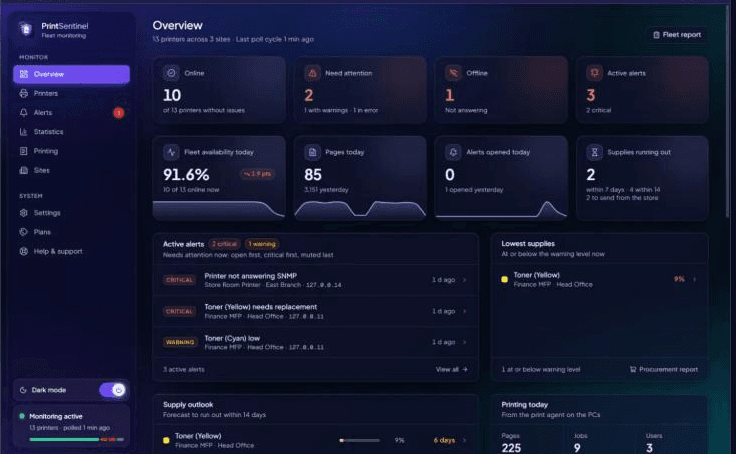
Printer monitoring built for the person who gets the call
PrintSentinel checks every printer every two minutes, opens an alert when something needs attention and resolves it when the problem clears.
One board for the whole fleet
Status, toner, trays and page counts for every printer at head office and every branch. Filter by site or by what needs attention, and open any printer to see its history.
Toner monitoring with forecasts
Live toner and ink levels for every printer, plus days left, not just a percentage. PrintSentinel learns how fast each printer really uses each supply and forecasts when it will run out, so replacements are ordered in time. A procurement report lists what to buy.
Alerts that reach a person, once
Desktop pop-ups, Microsoft Teams posts and email through your own mail server. Duplicates are folded together, and an alert closes itself when the problem is fixed.
Print tracking and audit
A light agent on each PC reports print jobs, with no print server needed. See print job history and pages by user, PC, printer and site, compare periods, and export to CSV for cost allocation.
Works with mixed printer brands
Scan an address range such as 10.20.1.1–254 and PrintSentinel picks up each printer's model, serial number and supplies over SNMP v1, v2c or v3. Network printers from HP, Canon, Kyocera, Brother, Epson, Ricoh and others that support the standard Printer MIB sit side by side.
Built for many offices
Each site polls on its own, so one slow branch link never holds up the rest. Quiet hours, muting and planned maintenance can be set per site or per printer.
12 things PrintSentinel watches for
It also tracks every consumable by name, from toner cartridges to the waste toner box, with warning and critical levels you set.
- Paper jam
- Out of toner
- Service requested
- Printer unreachable
- Supply missing
- Toner low
- Door or cover open
- Out of paper
- Input tray empty
- Output tray full
- Maintenance overdue
- Different machine at this address
Monitoring by lunchtime
- 1
Install it on one PC
Any always-on Windows 10 or 11 PC that can reach the printers, including branches over a VPN. It can also run as a Windows service with nobody signed in.
- 2
Find your printers
Create a site for each office and scan its address range. Nothing is installed on the printers and no firmware is changed.
- 3
Choose who hears about what
Send critical alerts to Teams and the IT desk, warnings by email, and pop-ups to connected PCs. Colleagues can open the dashboard in a browser with a viewer or helpdesk key.
A monitoring tool you never have to monitor
Designed so it never stops quietly, and never becomes a security problem of its own.
Works without the internet
Monitoring runs on your own network, and a paid licence keeps working offline for weeks.
Your data stays with you
Printers, alerts and print history live in a database on your server PC, backed up daily.
Keys for every role
Operator, helpdesk and viewer keys enforced on the server, with an activity log.
Encrypted and pinned
Client PCs talk to the server over HTTPS and pin its certificate.
Signed updates
Clients refuse any installer that isn't signed by the publisher.
Watches itself
Watchdogs notice if monitoring stops, and a heartbeat lets your other tools check on it.
PrintSentinel FAQ
What is PrintSentinel?+
PrintSentinel is printer fleet monitoring software for Windows. It reads each printer's own status over SNMP every two minutes and raises an alert when something needs a person, such as a paper jam, low toner, an open door or a printer that has stopped answering.
Do I need to install anything on the printers?+
No. PrintSentinel talks to printers over SNMP, which almost every network printer already supports. There are no agents or firmware changes on the printers. Print-job tracking uses a small optional agent on each PC.
Does my printer data go to the cloud?+
No. Monitoring runs on a PC on your own network and the data is stored in a database on that PC. Only licence checks reach the internet.
Is there a free trial?+
Yes. PrintSentinel has a 7-day free trial with all Business features and no card required. Current plans and prices are on printsentinel.app.
How do I monitor printer usage and toner levels across a network?+
Install PrintSentinel on one always-on Windows PC and scan your printers' address range. It then reads toner levels, paper trays, page counts and status from every network printer over SNMP, shows them on one dashboard, and forecasts when each supply will run out. The optional PC agent adds print job tracking by user and printer.
Is PrintSentinel printer management software or print management software?+
PrintSentinel is printer monitoring and fleet management software: it watches the health, supplies and usage of your printers and alerts you to problems. It does not replace your print server, release jobs or enforce print quotas the way full print management suites do, so it is simpler to install and run.
Does it work as a printer status monitor on Windows 10 and Windows 11?+
Yes. PrintSentinel runs on Windows 10 and Windows 11, either as a desktop app or as a Windows service, and shows the live status of every network printer, not just the ones installed on that PC.
Does it work with HP, Kyocera, Canon, Brother and Epson printers?+
PrintSentinel works with network printers and multifunction devices from any brand that support the standard Printer MIB over SNMP, which covers most office printers from these and other manufacturers. Different brands are monitored together on the same board.
Who built PrintSentinel?+
PrintSentinel is built by Senithu Software Solutions, a software development company in Sri Lanka. We also build custom monitoring, business and SaaS software for clients.
Find out what your printers have been keeping from you
Try every Business feature free for 7 days at printsentinel.app.
Try PrintSentinel printer monitoring freeNeed monitoring or business software built around your own workflow? Senithu builds it too. See our custom software development service.